
Welcome To Asta

Getting Started
Set-up guide
Platform Capabilities
Dashboard
Campaigns
Media Library
Device Management
Commands Management
Content Management
Add & Manage Media in Asta
Customize Your Media Experience
User & Role Management
Users
Roles & Permissions
Account Settings
Project Management
Projects Overview
Navigating the Project Dropdown Menu
Customization & Branding
Rebranding the Asta Application
Licensing & Legal
Licenses
Domain Quota
Media Library Overview
The Media Library is your one-stop hub to store, organize, and manage all your media files—images, videos, and GIFs. It seamlessly integrates with your campaigns, making it super easy to create impactful digital signage content.
Key Features of the Media Library
Supported Media Types
All common images files:
- .jpg
- .png
- .gif
Video
- .mp4
- .webm
Organizing Your Media
Create Folders
Group your files into folders like “Holiday Campaigns” or “Promotional Videos” for quick access.
Use Descriptive Names
Name your files clearly so you can find them easily.
Example: BlackFriday2025_Promo.mp4
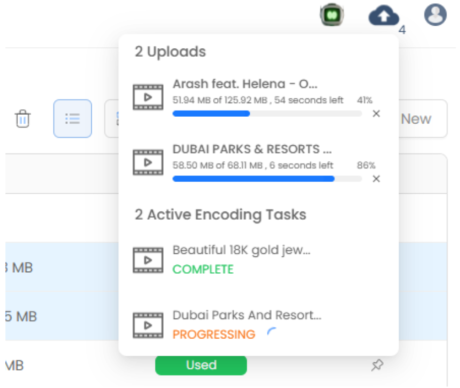
Track and Access Media
- Click on cloud icon for monitoring uploaded files.
- Check if your files are ready to use in campaigns.
Why Use the Media Library?
- It saves you time
- Keeps your content organized.
- Makes campaign creation a breeze.
Ready to get started? Dive into How you can add media to the Media Library now and keep your campaigns running smoothly!